
Cisco Criminal History Checks
Begin a Cisco criminal history check by naming the record, not just the person. The police report describes an event investigated by Cisco Police Department. The Cisco Municipal Court file concerns a city citation, ordinance case, or fine-only Class C matter. Eastland County Jail creates the booking entry after a custodial arrest, and county clerks preserve any later Class A or B misdemeanor or felony prosecution. Texas DPS keeps the statewide Computerized Criminal History event chain.
Use the most specific number you have. A report number belongs at the police channel, a citation number at municipal court, and a county cause number at the proper county clerk. These identifiers can differ even when they trace one Cisco event.
- Ask Cisco Police Department or City Hall which city custodian holds the incident or arrest report.
- Describe the date, approximate time, location, report number, and exact Cisco record requested.
- Contact Cisco Municipal Court for a citation or fine-only city case, using the citation number when known.
- Check Eastland County Jail for custody and the proper county clerk for a higher-level filed charge.
- Use Texas DPS public CCH or a fingerprint personal review only for the distinct statewide record product.
Cisco Records Start Downtown
Cisco City Hall at 500 Conrad Hilton Boulevard is the practical routing point when the Cisco police page does not identify a separate records desk. Cisco publishes its main line, (254) 442-2111, mailing address P.O. Box 110, Cisco, TX 76437, and city-secretary email. Ask for the Cisco police records custodian or Cisco's accepted Texas Public Information Act delivery method before sending a request. The official Cisco home page shows the local government entry point used for that routing.

That city channel matters when an online directory supplies contact information but no searchable Cisco criminal record database.
The city's official directory also helps locate the department or court page without relying on an outside records vendor.

The directory is a route to the public office, not a combined Cisco background report.
Records at the Cisco Police Department
Cisco Police Department creates records for incidents it investigates within Cisco limits. Those files may include an offense report, arrest supplement, call log, photographs, or video, subject to Texas access limits. No official page reviewed published a distinct police records email, direct records telephone, copy fee, or Cisco request form. Call the Cisco line and ask for current records instructions rather than guessing at an address or sending private data through an unconfirmed channel.
A useful request states the event date, approximate time and location, report number if known, and the exact item sought. Give a delivery contact so staff can clarify the scope or provide an estimate. Identification may be required for material available only to a subject, but Cisco has not published it as a blanket rule for all requests.
The Cisco police source page provides one official department starting point.

This department source should be used for Cisco police material, while the jail and court remain separate custodians.
Cisco College Police Records
A Cisco address does not prove that Cisco PD created the report. Cisco College Police Department is a distinct agency and appears in Texas DPS reporting-completeness material alongside Cisco PD and other Eastland County agencies. For an event tied to the college, first inspect the report, citation, or notice for the originating agency. A request sent to city police may fail simply because campus police holds the source file.
Cisco College lists campus police at 101 College Heights, Cisco, with (254) 442-5034 and a campus safety contact. Those details are for routing the college-created record. A later jail booking can still belong to Eastland County, and any filed higher-grade prosecution can still move to a county clerk.
The college's official campus safety page documents this separate public-safety channel.

The separate campus agency is the key local exception to a simple city-police or county-sheriff choice.
Booking and Arrest Records in Cisco
No official source identified a Cisco-operated long-term jail. Cisco PD creates its arrest or incident report, while Eastland County Jail creates the custody and booking record for a custodial city arrest. Call the jail information line at (254) 629-3899 or use the official Eastland County Sheriff TX app for current custody. Older booking material may require a focused public-information request to the sheriff at 201 W. White Street in Eastland.
A Cisco arrest report and an Eastland County booking entry answer different questions. The report records the Cisco officer's account and legal basis. The booking entry records intake, booked charge, custody, bail or holds, and release data as maintained by the jail. Neither one proves a conviction. If prosecutors file a higher-level charge, the final result appears in the clerk's docket and judgment.
For county-wide detail on that stage, the Eastland County arrest search route explains the app, jail telephone, report request, and clerk fallback.
Cisco Citation Versus County Case
A Cisco citation may never become an Eastland County criminal case. Municipal court handles Cisco ordinance matters and fine-only Class C offenses within its jurisdiction. Class A and B misdemeanors are heard in Eastland County Court, while felonies proceed in the 91st District Court. Searching the county clerk alone can therefore miss a Cisco citation that stayed entirely in Cisco.
Keep the allegation and outcome apart. A citation identifies the charged municipal matter. A plea, dismissal, deferred disposition, judgment, or other court entry tells what happened next. The Cisco court file is the right source for that result. If the charge moved to another court level, use the new cause number and custodian named in the filed papers.
Note: A payment screen is a transaction channel and does not establish that every docket entry or case document is available online.
The Cisco Municipal Court File
Cisco Municipal Court handles Cisco citations, city ordinance cases, and fine-only Class C misdemeanors. Its official page offers court information and payment links, but inspection found no city-hosted defendant-name search or case-number database. Contact the court or city at (254) 442-2111 and provide the citation number. Ask how to inspect the docket and whether an informational or certified copy is available.
The official Cisco Municipal Court page shows the city court route and its online citation functions.
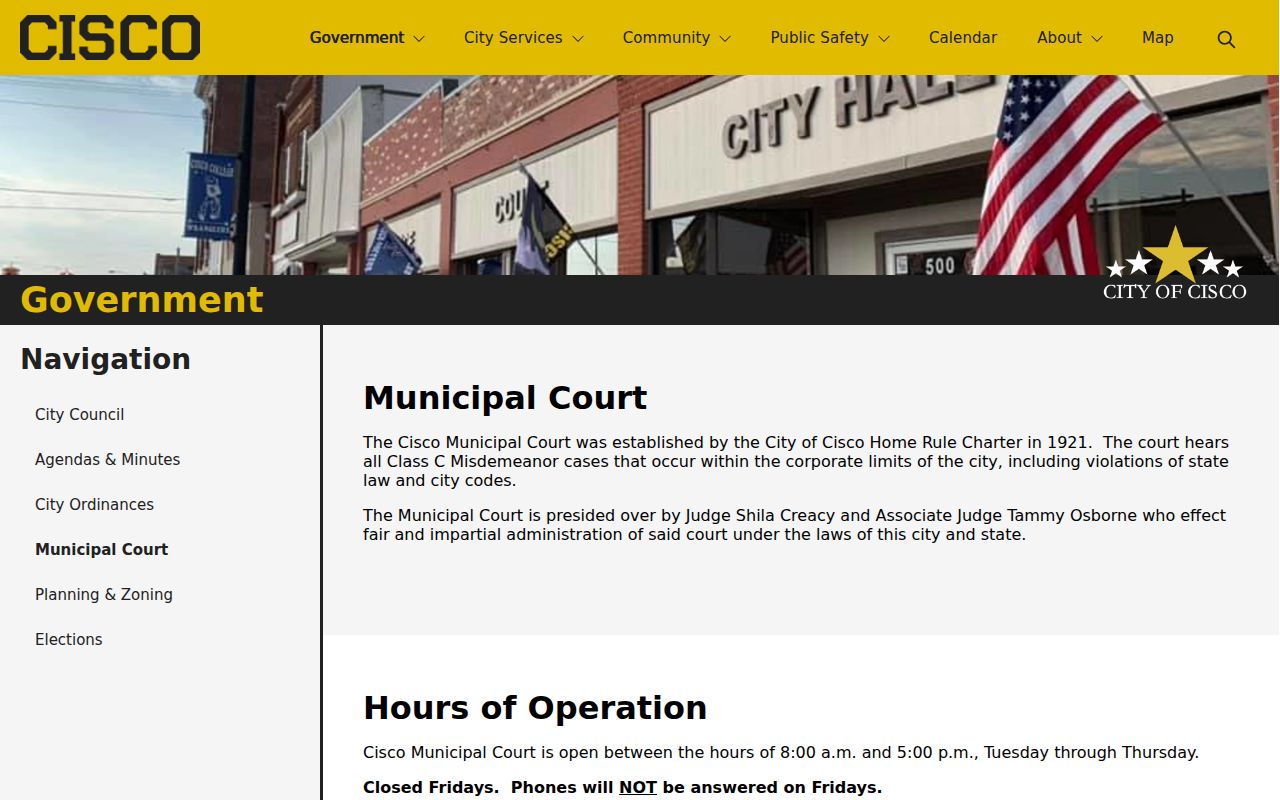
The page supports court contact and payment, but it should not be treated as a public Cisco criminal-history index.
| Court Name | Cisco Municipal Court |
|---|---|
| Case Types Heard | Cisco ordinance matters, citations, and fine-only Class C misdemeanors within municipal jurisdiction |
| Case Lookup Channel | Court or city telephone and counter fallback; no verified public defendant-name search |
| What the Docket Shows | Citation or case events, plea, settings, orders, disposition, and judgment when part of the municipal file |
| Copies & Fees | Ask the clerk for current inspection, copy, certification, delivery, and cost terms before ordering |
Build a Precise Cisco Record Request
The lack of a published city form does not turn a broad request into a better one. Identify the Cisco office and the record it created. For police material, state whether you seek the basic offense report, an arrest supplement, a call log, photos, or video. Add the event date, time, location, involved name, and report number when known. For court material, give the citation or case number and ask for the docket or a named filed item.
Ask for the city's accepted submission route, electronic delivery if offered, and an itemized estimate. Do not assume the office must combine Cisco PD, municipal court, county jail, county clerk, and DPS data into one report. Each governmental body responds for the information it maintains. A narrow request also makes it easier for staff to identify material subject to redaction without delaying unrelated public portions.
An additional Cisco Police Department page confirms the city's agency presence.

The page exposed no public name search, so a direct and narrow request remains the dependable Cisco fallback.
How Cisco Records Reach the County
A city event can create a sequence rather than one file. Cisco PD documents the incident and arrest. Eastland County Jail records the booking after custodial intake. The Criminal District Attorney decides whether and what higher-level charge to file. The County Clerk or District Clerk then keeps the court docket and judgment. Reporting agencies transmit eligible arrest and disposition events into Texas DPS criminal history.
Record flow: Cisco PD › Eastland County Courts › Texas Department of Public Safety
The stage controls where to look. A fresh Cisco incident may exist only with the agency. Current custody belongs at the jail. A city citation remains at municipal court, while a filed felony belongs with the District Clerk. The DPS public product is a reported statewide history, not a scan of every Cisco report or court filing.
Read Cisco Crime Records Carefully
Official crime totals require an agency and year. Search Cisco Police Department in the FBI Crime Data Explorer or Texas DPS Crime in Texas, then retain the reporting period and agency label. The research did not locate a stable official Cisco offense-count table, so missing output must not be reported as zero crime. Cisco College Police may also report separately, which makes a city label alone an unsafe basis for combining numbers.
Aggregate crime data can show the scale or kinds of offenses an agency reported. It cannot establish that a named person was arrested, charged, or convicted. Use the source Cisco record for an individual event and the proper court judgment for its result. This separation prevents a city-wide statistic from being mistaken for a personal record.
Cisco Record Access Rules
Texas access law starts with the office that maintains the record. Cisco may release public portions, redact protected identifiers, or withhold material covered by a statutory exception. Active-investigation information, victim-sensitive facts, confidential juvenile records, and information covered by an expunction or nondisclosure order may not appear. Municipal court records also follow judicial record rules and sealing law rather than becoming one city police disclosure file.
Key Statutes:
Texas Public Information Act - public city information is available unless an exception or another law protects it.
Government Code § 411.135 - Texas DPS may release specified public conviction and deferred-adjudication history, subject to name-match warnings.
Family Code § 58.008 - juvenile law-enforcement records are generally confidential under the statute's access rules.
A no-result search is not proof that no Cisco record exists. The record may sit with a different agency, remain unfiled, be outside portal coverage, or be lawfully restricted.
Close the Cisco Record Trail
Finish by comparing like with like. Confirm the Cisco PD report number and arresting agency. Confirm any Eastland County booking separately. If a prosecution was filed, read the correct municipal, county, or district docket and final judgment. For self-review of Texas repository data, use the fingerprint-based DPS personal-review route when identity certainty matters.
A name match should never replace the identifiers in the file. Names can refer to more than one person, and DPS states that fingerprints are the only positive way to associate a person with a repository record. If a Cisco disposition is missing from a personal history, obtain the clerk judgment and follow the DPS correction process with the reporting office.
A final Cisco review should name the Cisco agency beside each result. Mark the Cisco police report as an agency account, the Cisco citation as a municipal case, and the county booking as a custody record. If the Cisco event led to prosecution, attach the proper judgment to the sequence. This small habit keeps a Cisco allegation from being read as a conviction and keeps a Cisco payment entry from being read as a full docket. It also shows where a correction must start when one Cisco source conflicts with another.